Conversational Workflows
Conversational workflows are meant to be integrated in conversation interfaces, allowing a user to trigger a workflow, interact with it by providing inputs during its execution, and follow its progress.
The primary rendering surface for these workflows is Vibe Work, where users attach published workflows from the + menu. See Run Workflows in Vibe Work for the consumer-side experience.
This section covers the basics: sending messages, waiting for input, and streaming agent responses. Specialized topics live in their own sub-pages:
- Forms and confirmations — structured form inputs and quick confirmation prompts.
- Progress tracking — show a checklist of steps with live status updates.
- Canvas — return rich content (markdown, code, diagrams) and let the user edit it.
- Tool UI — render rich UI components and visualize tool execution.
- Publish in Vibe — surface a workflow as an assistant in Vibe Work.
Getting started
To use conversational workflow features, install the Mistral plugin:
uv add 'mistralai-workflows[mistralai]'The simplest conversational workflow sends an assistant message to the user, then waits for their response. Extend InteractiveWorkflow and use send_assistant_message() followed by wait_for_input() with ChatInput:
import mistralai.workflows as workflows
import mistralai.workflows.plugins.mistralai as workflows_mistralai


@workflows.workflow.define(
    name="greeting-workflow",
    workflow_display_name="Greeting",
    workflow_description="A simple conversational workflow",
)
class GreetingWorkflow(workflows.InteractiveWorkflow):
    @workflows.workflow.entrypoint
    async def run(self) -> workflows_mistralai.ChatAssistantWorkflowOutput:
        # Send a message to the user
        await workflows_mistralai.send_assistant_message(
            "Hello! I'm here to help you get started. What's your name?"
        )

        # Wait for the user's response
        user_input = await self.wait_for_input(
            workflows_mistralai.ChatInput()
        )

        name = user_input.message[0].text if user_input.message else "friend"

        return workflows_mistralai.ChatAssistantWorkflowOutput(
            content=[workflows_mistralai.TextOutput(text=f"Nice to meet you, {name}!")]
        )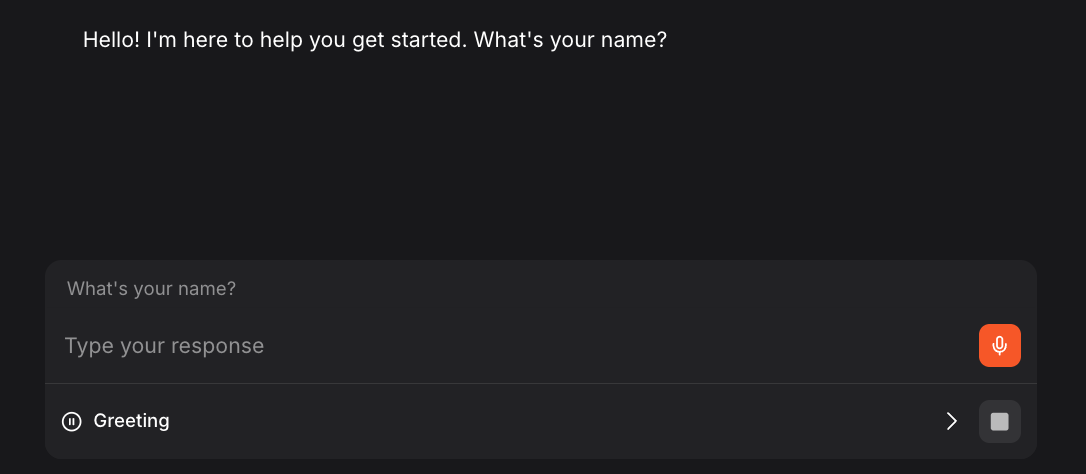
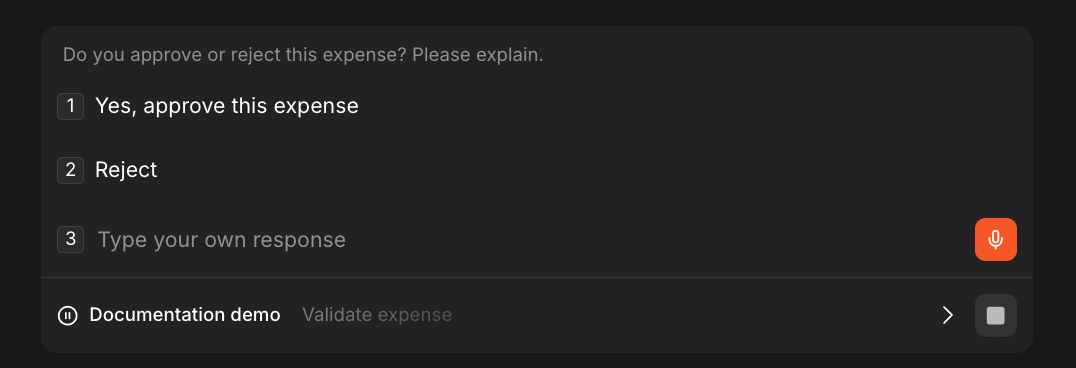
send_assistant_message() displays a message to the user in the Vibe Work chat interface. It also accepts an optional canvas keyword argument to include a CanvasResource alongside the text (see Canvas). ChatInput() pauses the workflow and waits for the user to respond. You can optionally pass a prompt to ChatInput() to provide additional context (in placeholder) and suggestions to offer pre-filled options that users can select directly.
Timeout
wait_for_input() accepts an optional timeout parameter. If the user doesn't respond within the specified duration, an asyncio.TimeoutError is raised. The timeout can be a timedelta or a number of seconds (float). By default, the workflow waits indefinitely.
from datetime import timedelta

# Wait for user response, but time out after 5 minutes
user_input = await self.wait_for_input(
    workflows_mistralai.ChatInput(),
    timeout=timedelta(minutes=5),
)Wrap the call in a try/except asyncio.TimeoutError block to handle the timeout gracefully instead of failing the workflow.
Streaming agent responses
When using agents with RemoteSession(stream=True), responses are automatically streamed to the UI as custom events. No additional code is needed:
import mistralai.workflows as workflows
import mistralai.workflows.plugins.mistralai as workflows_mistralai


@workflows.workflow.define(
    name="expense-analysis-workflow",
    workflow_display_name="Expense Analysis",
    workflow_description="AI-powered expense analysis",
)
class ExpenseAnalysisWorkflow:
    @workflows.workflow.entrypoint
    async def run(self, expense_data: str) -> workflows_mistralai.ChatAssistantWorkflowOutput:
        # Create a streaming session - responses will automatically
        # stream to the UI as they are generated
        session = workflows_mistralai.RemoteSession(stream=True)

        analyst_agent = workflows_mistralai.Agent(
            model="mistral-medium-2508",
            name="expense-analyst",
            description="Analyzes expense reports for policy compliance",
            instructions="""You are an expense report analyst. Review the expense data
and provide insights on:
1. Policy compliance
2. Unusual patterns
3. Optimization suggestions

Be concise and professional.""",
        )

        # The agent's response streams automatically custom events with JSON patches to update the UI.
        await workflows_mistralai.Runner.run(
            agent=analyst_agent,
            inputs=f"Analyze this expense report:\n\n{expense_data}",
            session=session,
        )

        return workflows_mistralai.ChatAssistantWorkflowOutput(
            content=[workflows_mistralai.TextOutput(text="Analysis complete.")]
)When stream=True, the agent's text output is streamed token-by-token to the UI. This provides a responsive experience for longer responses.
Complete example
Here's a full expense approval workflow combining todo list, user input, and streaming agent analysis:
import mistralai.workflows as workflows
import mistralai.workflows.plugins.mistralai as workflows_mistralai


@workflows.workflow.define(
    name="full-expense-workflow",
    workflow_display_name="Full Expense Processing",
    workflow_description="Complete expense workflow with AI analysis and approval",
)
class FullExpenseWorkflow(workflows.InteractiveWorkflow):
    @workflows.workflow.entrypoint
    async def run(self, expense_data: str) -> workflows_mistralai.ChatAssistantWorkflowOutput:
        # Define workflow steps
        analyze_item = workflows_mistralai.TodoListItem(
            title="AI Analysis",
            description="Analyze expense for compliance"
        )
        review_item = workflows_mistralai.TodoListItem(
            title="Manager Review",
            description="Get manager approval"
        )
        process_item = workflows_mistralai.TodoListItem(
            title="Process",
            description="Complete processing"
        )

        async with workflows_mistralai.TodoList(
            items=[analyze_item, review_item, process_item]
        ) as todo_list:
            # Step 1: AI Analysis with streaming (using context manager)
            async with analyze_item:
                session = workflows_mistralai.RemoteSession(stream=True)
                analyst = workflows_mistralai.Agent(
                    model="mistral-medium-2508",
                    name="expense-analyst",
                    description="Expense policy analyst",
                    instructions="Analyze the expense for policy compliance. Be brief.",
                )

                await workflows_mistralai.Runner.run(
                    agent=analyst,
                    inputs=expense_data,
                    session=session,
                )

            # Step 2: Manager Review (using context manager)
            async with review_item:
                decision = await self.wait_for_input(
                    workflows_mistralai.ChatInput(
                        "Do you approve or reject this expense? Please explain.",
                        suggestions=[
                            [workflows_mistralai.TextChunk(text="Yes, approve this expense")],
                            [workflows_mistralai.TextChunk(text="Reject")],
                        ],
                    )
                )

            # Step 3: Process (using manual status control for conditional logic)
            await process_item.set_status("in_progress")
            decision_text = decision.message[0].text if decision.message else ""
            if "approve" in decision_text.lower():
                result = f"Expense approved. {decision_text}"
            else:
                result = f"Expense rejected. {decision_text}"
            await process_item.set_status("done")

        return workflows_mistralai.ChatAssistantWorkflowOutput(
            content=[workflows_mistralai.TextOutput(text=result)]
        )


if __name__ == "__main__":
    import asyncio
    asyncio.run(workflows.run_worker([FullExpenseWorkflow]))